Every stage in its place
Mark each zone at its current coat stage. Recolour as the job moves so the GA shows the state of the work.
 YachtTracer™
For yacht paint & coating teams
From fairing to the final topcoat, colour progress zone by zone on the actual drawing. Give the yard and the owner’s representative a clear picture of the work.
No signup needed for the demo. Nothing to install.
FAMILIAR TOOLS. YOUR OWN PROCESS.
Paint and fill directly on the GA. Name the colours to match the specification, then carry that same key into the report.
Paint · Smart fill · Polygons · Named colours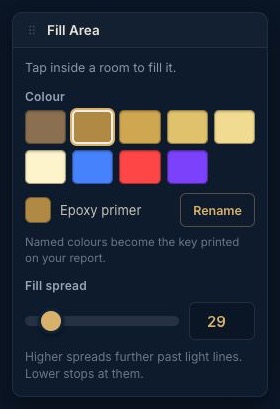
BUILT AROUND YOUR WORK.
A familiar drawing, a clear colour key and less time preparing the next report.
Explore the toolkitMark each zone at its current coat stage. Recolour as the job moves so the GA shows the state of the work.
Bucket-fill follows the drawing’s own boundaries. Mark a room or deck section without tracing the whole outline.
Calibrate the GA once, then take approximate distances from the drawing to support your planning.
Export the marked-up plan with its named colour key. The yard and the owner’s representative can read it without an account.
Pan and pinch to zoom into the work. Keep the same drawing close by in the site office or on the boat.
Keep jobs in separate editable project files. Save a copy to archive the work or take it to another device.
DRAWING. MARKUP. REPORT.
Open your drawing, or pick up a saved YachtTracer project.
Mark zones, name your colours and keep the detail on the drawing.
Export a PDF for the people who need to see the work. Saving and PDF export require a plan.
Yes. There are nine colour slots, and you can name them to match your own specification or work sheet. Those names appear in the colour key on the exported PDF.
No. Open a PNG, JPEG or WebP of your General Arrangement and mark directly on it. You can also reopen a saved .yachttracer project.
No. Send the exported PDF through the channels you already use. The reader needs no YachtTracer account or licence. Saving projects and exporting PDFs require a plan.
SEE IT FOR YOURSELF.
Open the real demo and try the tools on a plan.